How to Make a Loom in Minecraft? Best Minecraft Guide 2026
How to make a Loom in Minecraft using basic materials? Where can you naturally find one in a village? What is the best way to use it to create complex banner designs? You can create a loom by stacking two pieces of string vertically in a standard crafting table grid space over two wooden planks. Naturally generated looms are available in the savanna, desert, or plains village shepherd homes, where they can be easily selected and layered by putting a banner and dye in the UI (user interface).
What is Minecraft Loom?
While Minecraft building is absolute fun, sometimes the structure may be a majestic castle or a friendly pocket of a base with bare walls. One long-standing problem was that custom decorations, such as rainbow curtains or royal flags, had to be memorised, requiring players to burn through a lot of resources to create them.
Luckily, the Loom altered the inside decoration totally. This affordable utility block makes decorating fabric easier than ever, and it gives you all sorts of wonderful shapes, lines, and symbols to stamp out of a dedicated menu on banners. In this guide, we will discuss how to locate, create, and master the Loom so that your builds take advantage of this feature.
How To Find a Minecraft Loom?
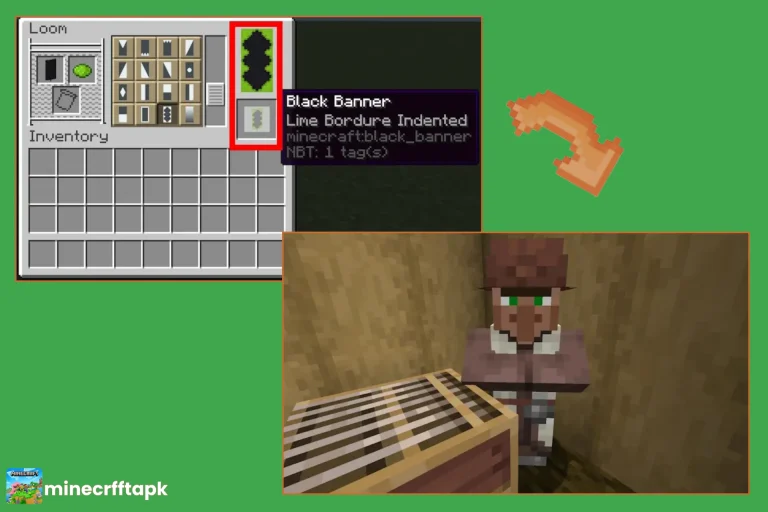
For those looking to save some resources in Minecraft APK game, it is easy to spot a loom in the real world. Looms naturally are generated in villages within shepherd houses. These houses can be identified by their carpets, wool blocks, and a brown apron that is attached to a villager who is wearing an eyepiece. The Loom is used as a job site block, which means that if any villager is sitting in the block and is not doing anything when you get close to it, it will instantly become a shepherd, and you can trade raw wool and string for emeralds. The Loom can be cut down with an axe or one’s hands and taken elsewhere.
REQUIRED MATERIALS
The Loom itself is extremely easy to build, and the materials for this can be harvested in the first 5 minutes of a new survival world.
How to Make a Loom in Minecraft?
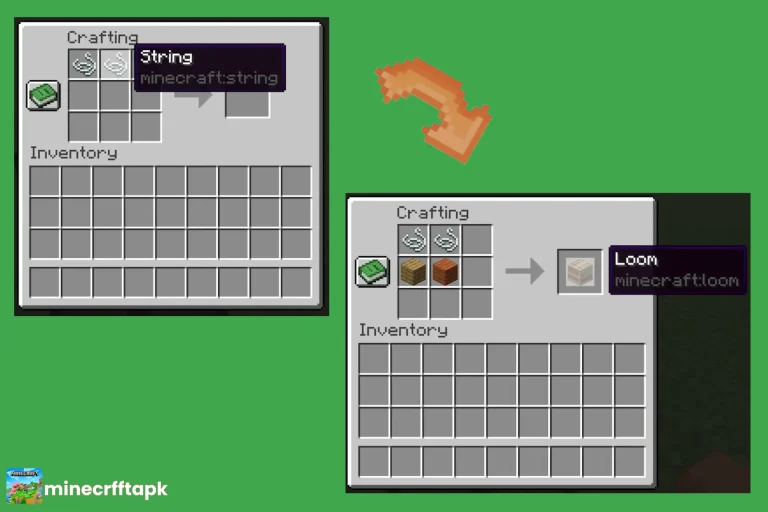
The essential ingredient to any loom is the following combination of materials: 2 strings and 2 wooden planks in a standard crafting table workspace. The design follows the principle of the machine: the thin portion of the string symbolises the weaving threads over a solid wooden base. When done the right way, the grid (graph) becomes a loom block.
Step-by-Step Guide:
Step 1
Obtain String: Two pieces of string will be required, and you can tie them with a few common techniques:
Defeat Spiders: Kill the spiders at night or visit the dark caves. When they die, they lose 0-2 pieces of string.
Harvest Cobwebs: For getting string items, went to the deserted mine shafts and, with the help of a tool like a sword or shears, cut down the cobwebs.
Cat Gifts: In the morning, when you wake up, you will find the cat gifts. The stray cats have brought you a piece of string as a good morning gift.
Step 2
Obtain Wood Planks: Punch a hole in any nearby tree trunk for raw logs. Open your basic craft grid of 2×2, place the logs in, and each log will be instantly transformed into 4 wooden planks. Only two of these planks need to be saved for the recipe.
Step 3
Access a Crafting Table
The crafting grid will enlarge to 4×4 and allow you to arrange all things on it when you hit the crafting table:
How to Use a Loom in Minecraft?
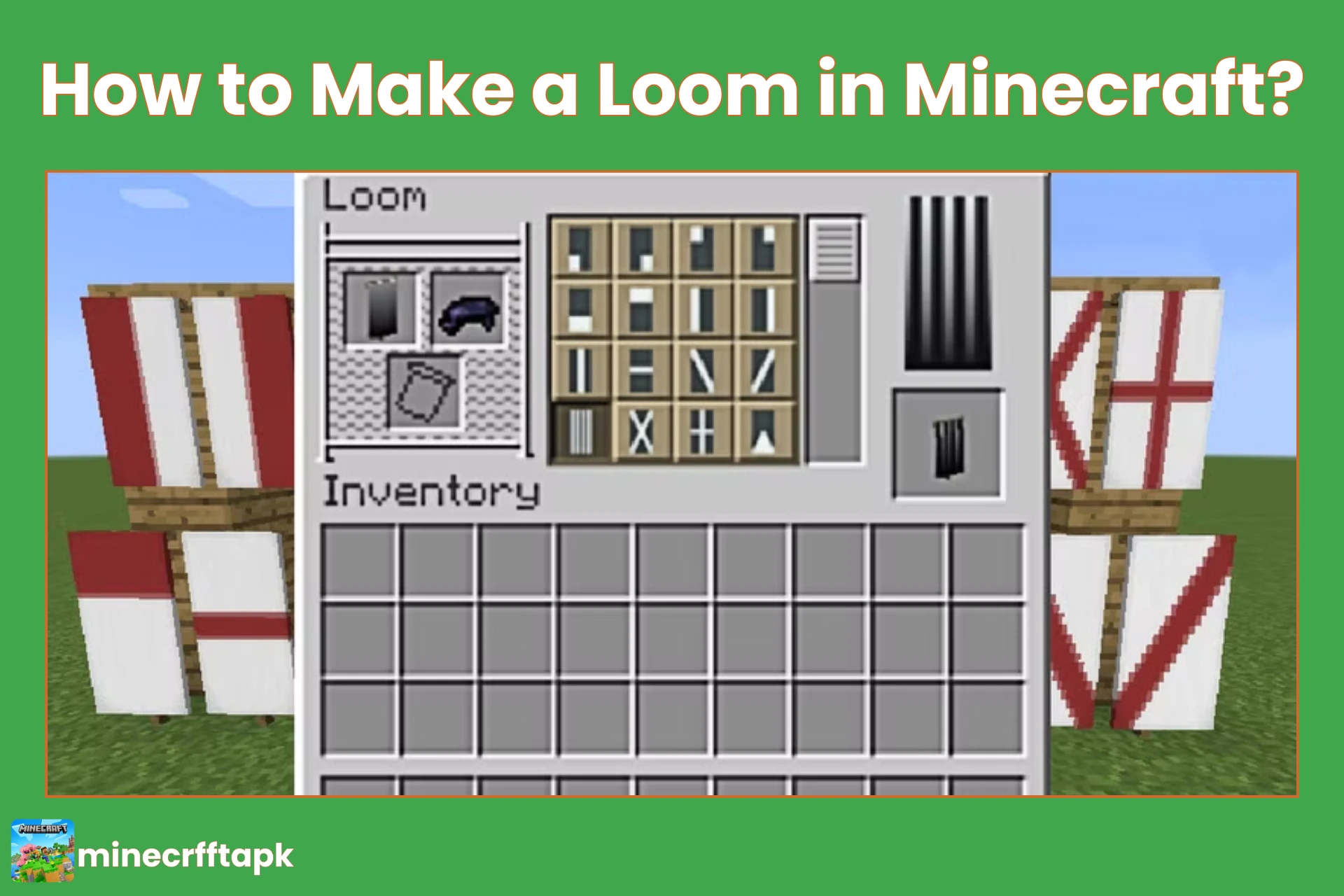
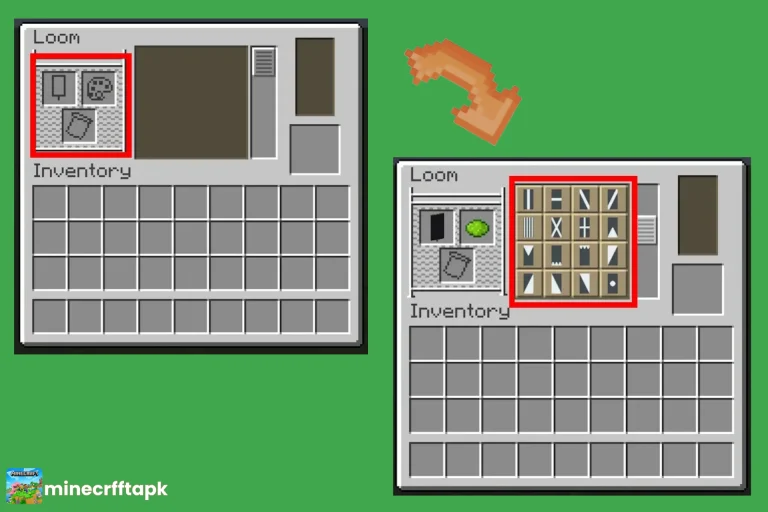
Right-clicking (RT) a placed loom opens up a distinct, graphical user interface (GUI) with three input slots at the left and a scrollable pattern directory in the middle, along with a preview box at the right.Right-clicking (RT) a placed loom opens a unique, graphical user interface (GUI) consisting of three input slots at the left, a scrollable pattern directory in the middle, and a preview box at the right.
This block can be used in two primary ways:
Standard Customization (Banners + Dye)
The main purpose of using the Loom is to make banners economically. Put a pre-made fabric banner into the top left compartment and some colored dye in the top-right compartment. The central menu will be automatically turned on and present dozens of default geometric options such as stripes, borders, gradients, triangles, and brick patterns. Choose your design and drag the completed banner out of the preview box. Since it uses only one dye for each action, the banner can be re-inserted into the Loom up to 6 times in order to add a second, third, etc. layer of color and shape.
Giving Villagers a Profession (Job Site Block)
It can also be used completely for village management purposes using the Loom. By placing a loom near a jobless villager, they will take it as their workstation and become a Shepherd. This opens a useful trading menu, in which you can purchase shears, colored beds, paintings, and blank banners for emeralds.
Banner Pattern
Physical Banner Pattern objects can be used to access rare, highly complex illustrations that are not provided as geometric shapes.
These are valuable individual schematics inserted into the bottom left of the loom UI (user interface) in the third position. These templates may be found in hidden treasure chests or created by crafting a piece of paper and using a certain prize item.
| Pattern Name | How to Get It / Crafting Recipe | Visual Design Result |
| Flower Charge | Paper + Oxeye Daisy | A beautiful, blooming flower crest. |
| Creeper Charge | Paper + Creeper Head | The iconic, menacing face of a Creeper. |
| Skull Charge | Paper + Wither Skeleton Skull | A classic pirate-themed skull and crossbones. |
| Thing | Paper + Enchanted Golden Apple | The legendary, classic Mojang studio logo. |
| Snout | Found in Nether Bastion Remnant chests | A stylised, distinct Piglin nose emblem. |
| Flow & Guster | Found in Trial Chamber vaults | Modern, wind-blown artistic swirls. |
Conclusion
The Loom is one of the most useful, enjoyable, and rewarding mods available in Minecraft. It takes away the hassle of old crafting table recipes and offers a whole new realm of interior design, all for the extremely low cost of two strings and two simple wooden planks. The Loom is perfect for making animated window coverings, a hidden pirate flag, or wrapping one around a custom map marker. It is a fast way and fun, so pick your wool, hunt some spiders and make your world now.
So, we have entirely discussed about “how to make a Loom in Minecraft?” in this comprehensive article.